
 Jerry Wang
Desktop laser engravers and cutters for homes are becoming increasingly popular, but there seems to be little attention to dealing with the large amount of toxic fumes generated by laser engraving and cutting. If the smoke is not processed effectively, it will cause serious harm to the human body. Especially in unventilated rooms, the fumes generated by laser engraving cannot be dispersed for a long time.
The xTool SafetyPro AP2 Air Purifier is an effective solution to the harmful fumes generated by laser engraving. To protect your health, I highly recommend that you purchase one to purify the toxic fumes and dust produced by laser engraving. The xTool SafetyPro AP2 Air Purifier can effectively deal with 99.99% of the harmful fumes, so the air coming out of the AP2 Air Purifier will be fresher than your indoor air. This is a top laser fume killer, and you don’t have to worry about fume protection when using a laser engraver at home anymore.
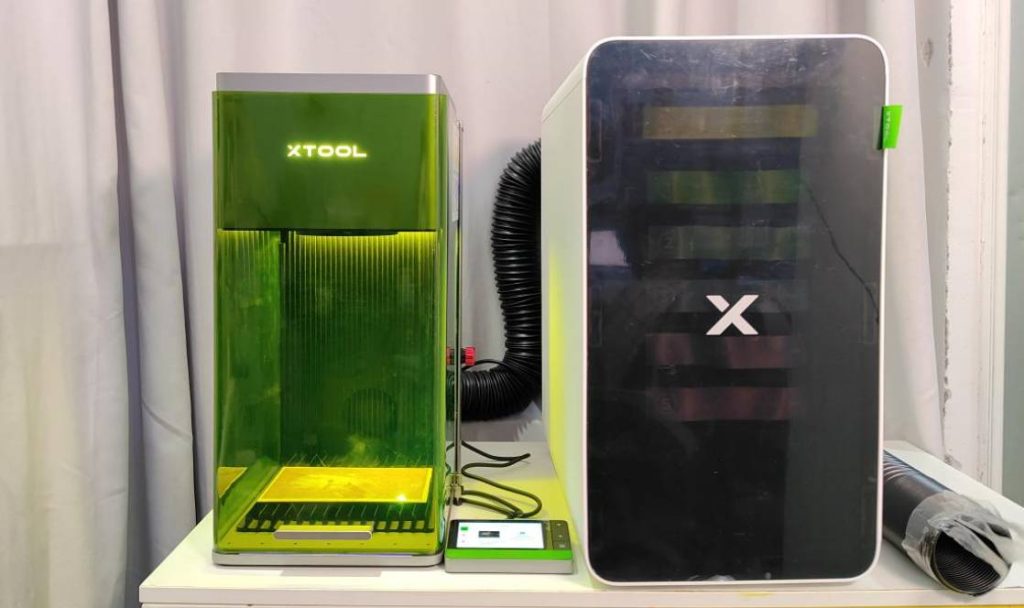
xTool SafetyPro AP2 Air Purifier Overview
Lifting the magnetic cover on the front of the xTool SafetyPro AP2 Air Purifier, you can see the 6-layer structure from top to bottom, which are the cyclone system, pre-filter, medium efficiency filter, activated carbon layer, ultra-dense carbon mesh, and HEPA filter.
Each layer of different filter cartridges is responsible for different filtration functions. For example, the cyclone filter separates 99% of large particles and prevents them from clogging the filter below. The pre-filter can intercept 90% of the smallest visible substances, such as dust, fibers, hairs, etc. The medium-efficiency filter is able to intercept 95% of dust particles up to 0.3 microns. The activated carbon layer, the fourth layer counting from the top, intercepts 84% of harmful fumes such as acid gases, SO2, etc. The ultra-dense carbon mesh absorbs odors such as VOCs, SO2, and other harmful volatile organic compounds. The last layer is called the HEPA filter, which can effectively filter 99.9% of 0.3μm dust, viruses, and other allergens. After layers of filtration, the final release of fresh air.

Therefore, the upper inlet of xTool SafetyPro AP2 Air Purifier is connected to the exhaust pipe of the laser engraver, and after the laser engraving fumes are filtered, fresh air will go out from the lower outlet. The AP2 air purifier can be adapted not only to the xTool FI Ultra but also to the xTool P2/P2S, the xTool M1 Ultra, and the xTool S1, making it a must-have companion for laser engraving machines.

The xTool SafetyPro AP2 air purifier is very easy to use, and there are no learning costs. You can manually adjust the airflow level. However, when you use it with xTool’s laser engravers, just plug the Bluetooth dongle into the laser engraver, and it will automatically turn on the automatic mode.
I am pleased that the SafetyPro AP2 Air Purifier has a wheeled design on the bottom! It’s very user-friendly to move around. I think the bulky xTool P2 should have this design as well.


Washable and Reusable Supercyclone filter
The xTool SafetyPro AP2 Air Purifier is innovative in that it utilizes a cyclone system for its first layer of filtration structure. Inside the cyclone system are 36 small cyclone groups, each of which separates and collects large particles in the fumes and smoke at the bottom by centrifugal force. This prevents large particles from clogging the other filters, thus greatly extending the life of the other filters.
The cyclone system, the first filter layer, is washable and reusable. It is very easy to disassemble and clean; simply unscrew the box of the cyclone structure, take out the rest of the structure inside, and clean it with water and detergent.


Connecting with xTool F1 Ultra
If you want the xTool SafetyPro AP2 air purifier to be smarter and automatically adjust the airflow levels according to the volume of smoke, you must connect the laser engraver to the SafetyPro AP2 using a Bluetooth dongle.
In the case of my xTool F1 Ultra, simply plug the Bluetooth dongle into the accessory socket on the back of the F1 Ultra, and the connection between the F1 Ultra and the SafetPro AP2 will be established automatically. After that, you don’t need to manually adjust the airflow level of the air purifier.

Furthermore, you can personalize the working setting of the SafetyPro AP2 and check the lifespan of each filter in the XCS software.

Air Purification Testing: Engraving wood
To check the true effectiveness of the xTool SafetyPro AP2 air purifier, I did some comparison experiments using the xTool F1 Ultra laser engraver. First, I used the xTool F1 Ultra to engrave plywood and placed an air quality detector inside the machine. When the xTool F1 Ultra started laser engraving, it immediately released a large amount of smoke. As you can see in the image below, the air quality inside the xTool F1 Ultra’s chamber quickly reached a serious harm level, with PM2.5 particles already well outside the range of the air quality detector, 999μg/m3.

However, I connected the xTool F1 Ultra to the SafetyPro AP2. When the laser engraving machine engraved the plywood again, I checked the air quality at the SafetyPro AP2 air outlet with the air quality detector. I was pleasantly surprised by the results! The PM2.5 density was only 3 μg/m3, and the TVOC density was 0, which was within human health standards.

The facts show that the xTool SafetyPro AP2 air purifier is indeed very effective in purifying the smoke from laser engraving. The purified air quality is surprisingly better than the air quality in my home! Before I started the test, I measured the air quality in my home once as a reference, and the results showed that the air quality was at the average level, with a PM2.5 density of 42 μg/m3, as shown below.

Air Purification Testing: Engraving Acrylic
Similarly, air quality conditions during laser engraving of acrylic were measured using the same comparison experiment. When the laser engraver started engraving acrylic, the PM2.5 density and the VOC density in the xTool F1 Ultra chamber exceeded the maximum range of the air quality detector. Therefore, if toxic fumes are released during laser engraving of acrylic, leather, or other plastic products, it will be very dangerous to human health and pollute the environment.

Fortunately, the harmful fumes are purified by the xTool SafetyPro PA2 and turned back into fresh air! VOC density becomes 0, PM2.5 density becomes 2μg/m3. Formaldehyde concentration is only 0.012 mg/m3, as shown below.

Low-dB Working Noise
The xTool SafetyPro AP2 air purifier features low-noise working, so I don’t feel bothered by noise when I use it at home. When the xTool F1 Ultra and xTool SafetyPro PA2 were both working at the same time, my ambient noise test recorded that they were working in the range of 58 dB to 67 dB.
When the SafetyPro AP2 was working at level 1 airflow, the noise was around 58 dB. However, when it was working at the highest level of 4 airflow, the noise level was around 67 dB. In fact, this noise level is suitable for me, as I don’t feel disturbed in my daily work.


Conclusion
So, of course, my conclusion is to recommend the xTool SafetyPro AP2 air purifier! Its air-cleaning ability is impeccable and is especially suitable for those of you who do laser engraving indoors or at home. If you need to use a laser engraver for a long time, you can’t ignore the effects of the fumes on your health. If you don’t have the conditions in your home to exhaust the fumes out of the window, then this xTool air purifier you must consider.
More information about xTool F1 Ultra: xTool F1 Ultra Review, xTool F1 Ultra Conveyor Review


