Jerry Wang
Introduction
The Aliencell X1 is a 40W diode laser built around three things most machines in this category still can’t deliver together—a genuinely large 24″×18″ work area, a fully standalone touchscreen OS that frees you from your computer, a camera for remote monitoring, and an AI dual-camera vision system that handles material positioning automatically. I spent several weeks testing it across real projects: photo engraving on black aluminum business cards, cutting through 20mm pine in a single pass, producing 28 laser-engraved bookmarks in one unattended batch run, and completing a 5-layer relief art piece in under 80 minutes.
If you’re running a small laser business or are serious about starting one, the Aliencell X1 is worth a long, hard look. I put it through several weeks of real-world testing to find out whether that promise holds up. To help you quickly understand the overall performance of the Aliencell X1, here are my ratings across seven key categories, based on several weeks of real-world testing.
Comprehensive Score of Aliencell X1
Summary
The Aliencell X1 is a true game-changer that represents the future of smart crafting. It’s not just a machine; it’s a reliable partner that turns complex batch production into a simple, worry-free experience. With its perfect balance of massive workspace, incredible speed, and top-tier safety, it is undoubtedly the smartest investment for any small business owner looking to scale with confidence.
Aliencell X1 At a Glance: Quick Specs Overview
Before I get into the real-world test results, let me lay out exactly what you’re getting with the Aliencell X1 and which version is worth your attention.
The Aliencell X1 comes in three power options: 20W, 40W, and 60W. All three share the same core features: the dual-camera vision system, the standalone touchscreen OS, the 10 flame sensors, the PM10 air quality monitor, and the same basic chassis. The power differences show up mainly in cutting depth.
Here’s the full spec breakdown:
| Specification | Aliencell X1 20W | ⭐ Aliencell X1 40W (I tested) | Aliencell X1 60W |
| Laser Type | Diode | Diode | Diode |
| Work Area | 610 × 465mm | 610 × 465mm | 595 × 455mm |
| Max Engraving Speed | 600mm/s | 600mm/s | 600mm/s |
| Max Acceleration | 20,000mm/s² | 20,000mm/s² | 20,000mm/s² |
| Laser Spot Size | 0.08 × 0.10mm | 0.08 × 0.10mm | 0.08 × 0.16mm |
| Max Cut — Pinewood (single pass) | — | 20 mm (real test) | — |
| 3mm Plywood Cut Speed | — | 15 mm/s (real test) | — |
| Price | $1,799 | $2,299 | $2,899 |
Unboxing & Setup: From Box to First Cut in Minutes
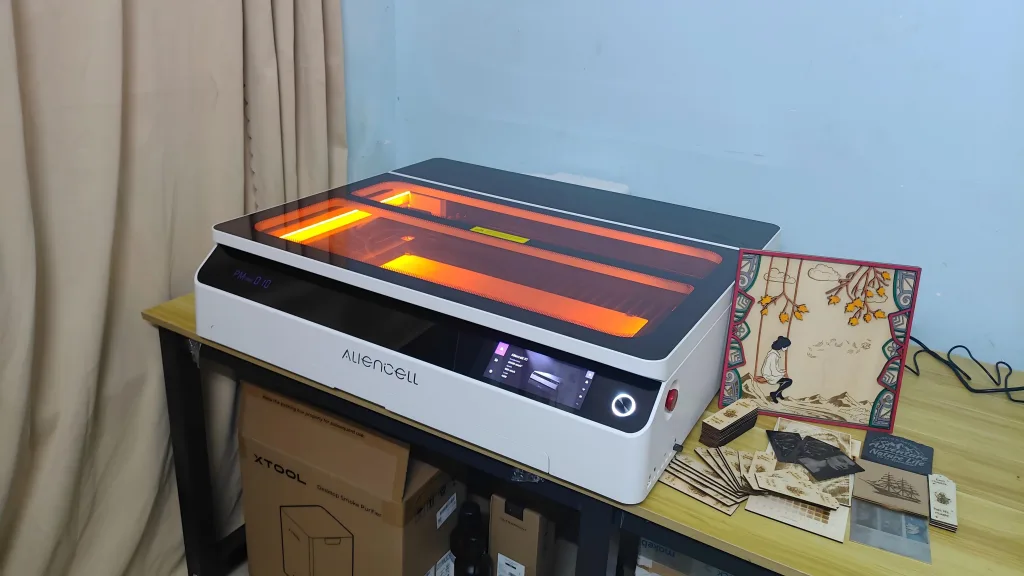
When the Aliencell X1 arrives, the first thing you notice is its sheer scale. Unlike typical desktop lasers that feel like hobbyist toys, the X1 is a substantial piece of machinery. While it does take up more desk space than a standard 40W laser, every inch of that footprint is justified by its massive 24″×18″ work area and its robust, fully enclosed industrial chassis.


One of the most frustrating parts of getting a new laser is the hours spent on complex assembly. The Aliencell X1 eliminates this barrier entirely. It arrives almost completely pre-assembled.
In my testing, I found that you don’t need to deal with the annoying task of building frames or tensioning belts. The modular components, like the 40W laser head and the exhaust system, snap into place with precision. From the moment I cracked the seal on the box to being ready for my first project, the entire process was seamless. It is a genuine “out-of-the-box” experience that allows laser small business owners to skip the technical setup and start earning immediately.

The design of the Aliencell X1 is incredibly sleek and modern. With its smooth lines and premium finish, it looks more like a high-end office workstation than a traditional workshop tool. But the beauty isn’t just skin-deep.
The Aliencell X1 is good at smart desktop management. Aliencell has solved the “cable chaos” common in laser setups. One of the most impressive features is the integration of Bluetooth connectivity for accessories. The connection between the computer and the machine, as well as between the machine and the smart air assist pump, can all be handled wirelessly via Bluetooth. This wireless ecosystem keeps your workspace clean and professional, allowing for a clutter-free environment that boosts focus and productivity.


Once connected to power, the Aliencell X1 doesn’t just sit idle. Instead, it requires a comprehensive 10-minute self-check and optimization before its first use. This isn’t just a basic power-on scan; it is a deep hardware “physical exam” that covers precision calibration of the motion system, automatic coordinate alignment for the dual-camera system, and functional verification of all 10 integrated flame sensors.
For first-time users, this ten-minute wait is incredibly valuable. It replaces the tedious task of manually tuning motion components and uses system algorithms to ensure that optical positioning perfectly matches the physical cutting path. This level of automation means there is virtually no learning curve for the hardware setup. Whether you are a seasoned professional or a complete novice, the Aliencell X1 ensures that your focus remains on your creative projects, not on troubleshooting hardware connections.
Hardware & Design: Built for Safety and Scale
The Aliencell X1 laser engraver isn’t just a powerful tool; it’s a high-capacity workstation designed to handle the rigors of a professional production line. While many desktop lasers prioritize a compact footprint, the X1 leans into industrial-scale capability, offering features that redefine what a desktop laser machine can do.
A Massive Workspace for Serious Production
One of the most significant advantages of the Aliencell X1 is its massive effective work area. At 610 x 465 mm (24 x 18.3 inches), it offers one of the largest processing spaces available in its class. For a small business, this extra room is a game-changer. It allows you to process large-scale art pieces or, more importantly, run massive batches of smaller items, like my recent run of 28 bookmarks, in a single session. This scale drastically reduces the manual labor of reloading materials and increases your hourly output.

The Safety Suite: A Fully Enclosed Smart Cabin
Safety is where the Aliencell X1 truly separates itself from the competition. As a Class 1 fully enclosed laser, it provides a worry-free environment for home studios.
- 10 Integrated Flame Sensors: While most machines have one or two sensors, the X1 monitors the entire bed with ten sensors. Any flare-up is detected instantly, triggering an emergency stop.
- PM10 Air Quality Monitoring: The machine features real-time air quality tracking. You can monitor the smoke and particle levels directly on the screen, ensuring your exhaust system is working efficiently.
- Remote Video Monitoring: A dedicated camera located in the bottom-left corner of the machine allows you to keep an eye on your project from the touchscreen or PC. This convenience means you can manage other tasks while your Aliencell X1 works safely in the background.
- Dual Exhaust Fans for Powerful Smoke Extraction: The Aliencell X1’s larger workspace requires a more powerful smoke extraction system. Its dual exhaust fans quickly and efficiently draw smoke away, preventing it from spreading throughout the room.


Intelligent Air Assist and Precision Protection
The Smart Air Assist Pro is far more than just a pump. It is fully integrated into the machine’s logic, automatically adjusting the airflow based on your specific material parameters. During heavy cutting, it ramps up to protect the lens from soot and ensure clean, char-free edges. During delicate engraving, it scales back to prevent detail loss. This automated control ensures the best results without any manual guesswork.
The Future of Intelligent Workflow: What You See is What You Get
The Aliencell X1 represents the “next generation” of laser technology through its Dual Positioning Cameras. Unlike traditional lasers that require manual focusing and alignment, the Aliencell X1 features Fully Automatic Calibration.
The AI vision system renders your design onto the material with incredible accuracy in the software. With automatic parameter settings, the machine can suggest the ideal power and speed for your project, ensuring the final output matches the digital preview perfectly. These smart features, including standalone OS, dual-camera alignment, and automated settings, are not just conveniences; they represent the future of intelligent laser engravers for small businesses.


Take the following image engraving as an example. Once the dual 8MP cameras have precisely positioned the object, simply click auto focus on the software, after selecting the appropriate material (such as a black business card), it will automatically set the optimal engraving parameters. Importantly, I can view a real-time rendering of the engraving to preview the final result. As shown in the image below, the portrait engraved on the black aluminum business card is extremely detailed, and the rendered preview closely matches the actual engraved result.

The remote monitoring feature is extremely practical; the Aliencell X1 is the first laser engraver to offer remote video monitoring of the entire engraving process. With video monitoring, I don’t have to stand in front of the machine every moment. While the machine is working in the studio, I can handle other tasks outside the studio, and the situation inside the machine is clearly visible through the software interface.

Power & Efficiency Test: Pushing the 40W Diode to Its Limits
When we talk about a 40W diode laser, the expectations are naturally high. But as anyone in the industry knows, “advertised speed” and “usable speed” are often two different things. In this chapter, I put the Aliencell X1 through its paces with two of the most common workshop materials: 3mm Plywood and Thick Pinewood.
Real-World Speed: Is 600 mm/s a Myth?
I started with a baseline test on 3 mm plywood. Many machines claim high speeds but suffer from vibration or “ghosting” when they actually hit those peaks. The Aliencell X1, however, delivered a genuine 600 mm/s engraving speed with remarkable clarity. Thanks to its 20,000 mm/s2 acceleration, the laser head reaches top speed almost instantly, which is a massive win for time-sensitive projects.
When it came to cutting the same 3 mm plywood, the efficiency was equally impressive. I was able to achieve clean, drop-out cuts at a maximum speed of 15 mm/s. For a small business owner, this means your “cutting-to-profit” ratio is significantly higher than older 10W or 20W models.

The 40W Cutting Beast: 10mm to 20mm Pine
The real test of a 40W laser is depth. I moved on to solid Pinewood, starting with a 10 mm plank.
At 100% power and 2 mm/s, the Aliencell X1 cuts through in a single pass like a hot knife through butter. The edges were incredibly clean with minimal charring. I even pushed it to 3 mm/s, which also resulted in a successful single-pass cut, though for daily production where consistency is key, I’d recommend sticking to 2 mm/s for that perfect finish.

Then, I pushed it to the absolute limit: 20 mm Pinewood. The Aliencell X1 can cut through 20 mm pine in a single pass at 1 mm/s and 100% power. This is an incredible feat for a diode laser. However, from a professional standpoint, I don’t recommend single-pass cuts at this thickness. Because of the slow speed required, the bottom of the wood tends to burn and carbonize. If you need to process 20mm material, my expert advice is to use multiple passes at a slightly higher speed to maintain that premium, professional edge quality your customers expect.

Overall, the 40W power of the Aliencell X1 is formidable. It provides a massive “power overhead” that makes everyday 3-5mm projects feel effortless and allows you to tackle heavy-duty projects when the need arises.
Multi-Material Deep Dive: From Metal to Wood
A professional Smart Laser Engraver is defined by its versatility. After testing the raw power of the 40W module, I spent several days exploring how the Aliencell X1 laser engraver handles fine art across different textures. This phase is where the machine’s precision really shines, moving from photo-realistic gradients on metal to crisp vector lines on organic materials, proving why it’s considered the Best Diode Laser for Small Business.
The Art of Photo Engraving: Detail Meets Predictability
Photo engraving is the ultimate “stress test” for any 600mm/s Laser Engraver because it requires perfect control over grayscale. I started with a challenging 47 x 84 mm Black Aluminum Business Card. The source photo was quite dark, but the software’s intuitive interface allowed me to manually adjust the brightness and contrast before hitting start. In just 7 and 9 minutes, the two photo result was breathtakingly sharp. What really stood out, though, was the time estimation accuracy. For a small business owner, knowing exactly how long a job takes is the difference between a chaotic workday and a perfectly planned production schedule.

Transitioning to Plywood Portraits (108 x 193 mm), I used Jarvis Mode at 400 mm/s. By manually tightening the line interval to 0.08 mm. The Aliencell X1 40W doesn’t produce particularly impressive results when engraving images on plywood; I’d say it meets general expectations. This result is actually the best I’ve achieved after multiple tests. The software’s rendering of image format engraving results on plywood isn’t ideal, as shown in the comparison below between the actual engraving and the rendered result. However, the rendering previews for other materials are quite accurate.


However, the real breakthrough came with Stainless Steel Photo Engraving. Since the Aliencell Space software currently does not offer automatic parameter settings and rendering previews for stainless steel, I need to manually determine the optimal parameters for engraving on stainless steel using the Aliencell X1. My initial tests at 35% power were too faint. After a deep dive into the parameters, I found the “holy grail” of settings. While 70% power, 0.05 mm line interval, Jarvis mode produced a deep, slightly dark contrast, the 50% power at 400 mm/s (0.05 mm interval) was the clear winner. It created a bright, high-contrast image that felt premium to the touch. This kind of parameter reliability makes the Aliencell X1 40W Review stand out; it doesn’t just engrave, it masters the material.

Precision Vector Engraving: Speed That Empowers Growth
Vector engraving is the bread and butter of any custom merchandise business. In this part of my Aliencell X1 40W Review, I focused on how the machine handles the rapid-fire production of coasters and decor.
On Rock Coasters, the Aliencell X1 is a speed demon. Using 15% power at 400 mm/s, a detailed 85 x 73 mm design was finished in a mere 3 minutes. The permanent white-on-black contrast was incredibly crisp, with zero jagged edges. The speed and quality here mean you can fulfill a large order in hours, not days. It’s worth noting that when it comes to vector-based engraving, the Aliencell Space software provides a highly accurate rendering preview for various materials—what you see is what you get.


I also engraved some oak coasters. It took a total of 6 minutes to engrave a 149 x 127 mm vector design using the following settings: 35% laser power, 400 mm/s engraving speed, and 0.11 mm line spacing. Using the same settings, it took only 3 minutes to engrave an 89 x 68 mm vector design on an MDF board.
After conducting a wide variety of engraving and cutting tests, I believe the Aliencell X1 is one of the best diode lasers for small business owners who need a machine that can grow with their product line. The Aliencell X1 40W guarantees efficiency for small businesses with its engraving quality, cutting capabilities, and cutting-edge smart workflow.


Case Study: 5-Layer Wall Art Production
For many laser users, layered wall art is where things get serious and seriously time-consuming. I wanted to push the Aliencell X1 through a real production scenario: a 280 × 280 mm, 5-layer plywood project. This wasn’t just about aesthetics. It was an efficiency test under conditions small business owners actually face.
The work area gave me room to work. I placed two 300 × 300 mm plywood sheets on the bed at the same time. Instead of processing layers one at a time, I ran two pieces through the same setup.

For anyone running small-batch production — custom signage, wedding favors, on-demand art — this cuts out the reload-and-recalibrate cycle between runs. It’s not revolutionary, but it adds up when you’re turning out 10–20 pieces a day.
Here’s how the 5-layer project actually ran:
| Layers | Time | Settings |
| 1 & 2 | 27 min | Layer 1: 35% power, 400 mm/s (engraving); Layer 2: 100% power, 12 mm/s (cutting) |
| 3 & 4 | 17 min | 100% power, 12 mm/s |
| 5 | 3 min | 100% power, 12 mm/s |
Total machine time is 47 minutes. Add roughly 30 minutes for painting, drying, and bonding, and a finished layered wall art was ready in under 80 minutes. Pieces like this typically sell for $40–$80 on Etsy or at local markets. Even at the low end, you’re looking at a strong hourly return once you factor in material cost. The Aliencell 40W X1 doesn’t just engrave, it produces. For a small-batch maker, that’s the difference between a hobby and a business.


Batch Production: Empowering Your Small Business
This is where the massive 610 x 465 mm (24 x 18.3 inches) work area transforms from a luxury into a powerful business asset. On a standard laser, you would have to split an order of 28 pieces into multiple runs, constantly reloading materials and re-aligning designs. With the Aliencell X1, I filled the entire bed with 28 pieces of 120 x 43 mm bookmarks in a single setup.

By using the smart laser engraver workflow, I dropped my designs into the software, and the dual-camera system ensured everything was perfectly aligned. The ability to “set it and forget it” for over an hour allowed you to focus on other parts of your business, like customer service and designing, while the machine handled the labor.

Thanks to the combination of the 40W laser power and the fast 600mm/s engraving speed, the results were staggering:
- Batch Size: 28 Pieces
- Total Machine Time: 1 Hour and 38 Minutes
- Average Time Per Piece: Approx. 3.5 Minutes
So, if you’re preparing for a craft fair or fulfilling a bulk corporate order, this level of throughput is a game-changer. The Aliencell X1 moves you away from “hand-crafting” and toward “micro-manufacturing.” It provides the industrial-grade capacity usually reserved for expensive CO2 laser machines, like xTool P2, but in a smart, user-friendly package.
Offline Operation & Power-Loss Recovery: Two Features I Actually Rely On
If you’re running a small business, you know that machine downtime isn’t just annoying, but it costs money. These two features on the Aliencell X1 are what quietly make it one of the most dependable 40W diode lasers I’ve used.
No Computer, No Problem
The Aliencell X1 features a large 6.86-inch screen, and its user-friendly interface and interactivity make it the best laser engraver I’ve ever seen. Beyond these user experience features, its standout feature for small laser businesses requiring repetitive production is its offline operation feature.
Once I send an engraving file from my computer to the Aliencell X1, the screen remembers the last file used. Therefore, if I’m a small business owner needing to produce in batches, I simply select the file for the previous job directly or import the engraving file from an external storage. I just need to place the same material in the machine; there’s no need to reset parameters such as engraving settings or autofocus.

Power-Loss Recovery: The Feature That Saved Me Once
The true test of a machine’s reliability happens when things go wrong. I experienced this firsthand during my batch production of 28 wooden bookmarks. In the middle of this nearly two-hour session, I encountered an unexpected power outage. Normally, this would mean losing a significant amount of material and over an hour of work.

However, once power was restored, the Aliencell X1’s Power-Loss Recovery system prompted me to resume the job. The laser head moved back to its last recorded position precisely and continued the batch exactly where it had stopped. Every single one of the 28 bookmarks came out perfectly, with no visible line or “seam” from the interruption. This “restart and resume” capability turns a potential financial loss into a minor pause, making the Aliencell X1 the reliable laser engraver for small business owners who need absolute peace of mind during high-volume production.

Features I like
- True 600mm/s engraving speed — verified.
- Massive 24″×18″ work area for batch production.
- Dual 8M camera system for precise positioning.
- Standalone Linux OS with touchscreen — no PC needed.
- Highly accurate job time estimates (great for production planning).
- Power outage resume (critical for batch production).
- 10 flame sensors and a PM10 air monitor, all-around safety guard.
- Features remote camera monitoring, so you don’t have to stay by the machine.
- A highly intelligent workflow where every step is straightforward—simply click the mouse to complete the prep work.
Room for Improvement
Based on my hands-on testing, the Aliencell X1 has already reached an excellent level in terms of hardware. I hope the engraving rendering feature in the Aliencell Space software will be improved as soon as possible to support rendering previews for more materials. This feature is really great!
Final Verdict: Who Should Buy the Aliencell X1?
After weeks of rigorous testing, my conclusion is clear. The Aliencell X1 laser engraver is a professional-grade workstation that successfully bridges the gap between hobbyist diode lasers and expensive industrial CO2 machines. It is the reliable diode laser for small business owners who are ready to stop “tinkering” and start “manufacturing.”
If you are serious about scaling your creative passion into a profitable, efficient venture, the Aliencell X1 is quite possibly the smartest investment you can make this year. It doesn’t just engrave your designs; it empowers your business.
FAQs
Does the Aliencell X1 40W really engrave at 600 mm/s?
Yes, I verified this in testing on 3 mm plywood. The 20,000 mm/s² acceleration allows it to reach and maintain 600 mm/s with clean results, thanks to the AI vibration-compensation system.
How thick can the Aliencell X1 40W cut?
In my tests, the 40W version cut 10mm pine in one pass at 2mm/s (recommended setting). It also cut 20 mm pine in one pass at 1 mm/s, though the bottom showed some charring, so I’d recommend two passes for clean results on 20 mm material.
Can I use the Aliencell X1 without a computer?
Yes. The Aliencell X1 runs a Linux-based smart OS with a 6.86″ touchscreen. You can upload designs, run jobs, and monitor progress entirely offline. It also supports power outage resume, which is critical for long batch production runs.
What materials can the Aliencell X1 engrave and cut?
It supports 300+ materials. In my testing, black aluminum business cards, plywood, stainless steel, oak, slate stone, and MDF all produced excellent results. For cutting, it handles wood up to 20 mm, leather, acrylic, and more.
What are the best settings for stainless steel photo engraving?
Based on my testing, the best settings are: 50% power / 400mm/s / Jarvis mode / 0.05mm line interval. This gives bright, detailed results. Avoid gray mode or 0.11 mm line intervals on stainless steel—the output will be too faint.
How good is the Aliencell X1 for batch production?
Very good. With the 24″×18″ work area and 600 mm/s speed, I produced 28 bookmarks (120×43 mm each) in just 1 hour 38 minutes in a single run. The accurate job time estimates also make production scheduling much easier.
Is the Aliencell X1 laser engraver safe for home studio use?
Yes — it’s one of the safest diode lasers available. It has 10 integrated flame sensors, a PM10 air quality monitor, fire-resistant materials, remote monitoring capability, and 10+ international certifications, including FDA, CE, and FCC.
What’s the difference between Aliencell Space and LightBurn for the Aliencell X1?
Aliencell Space is optimized for the Aliencell X1 hardware and offers auto-parameter recommendations, which is great for beginners and fast workflows. LightBurn is the industry standard with broader community support and fine-tuned manual control. Both work natively with the Aliencell X1.
What’s the best Aliencell X1 Combo to buy?
The 40W version offers the best balance of cutting power, work area, and engraving precision. The Pro Combo (with Air Assist Pro and Air Purifier) is worth it for cleaner, deeper cuts and is more eco-friendly in a home studio. Avoid the 60W if maximizing work area matters; it’s slightly smaller at 595×455 mm vs. the 40W’s 610×465 mm.